The referral programme
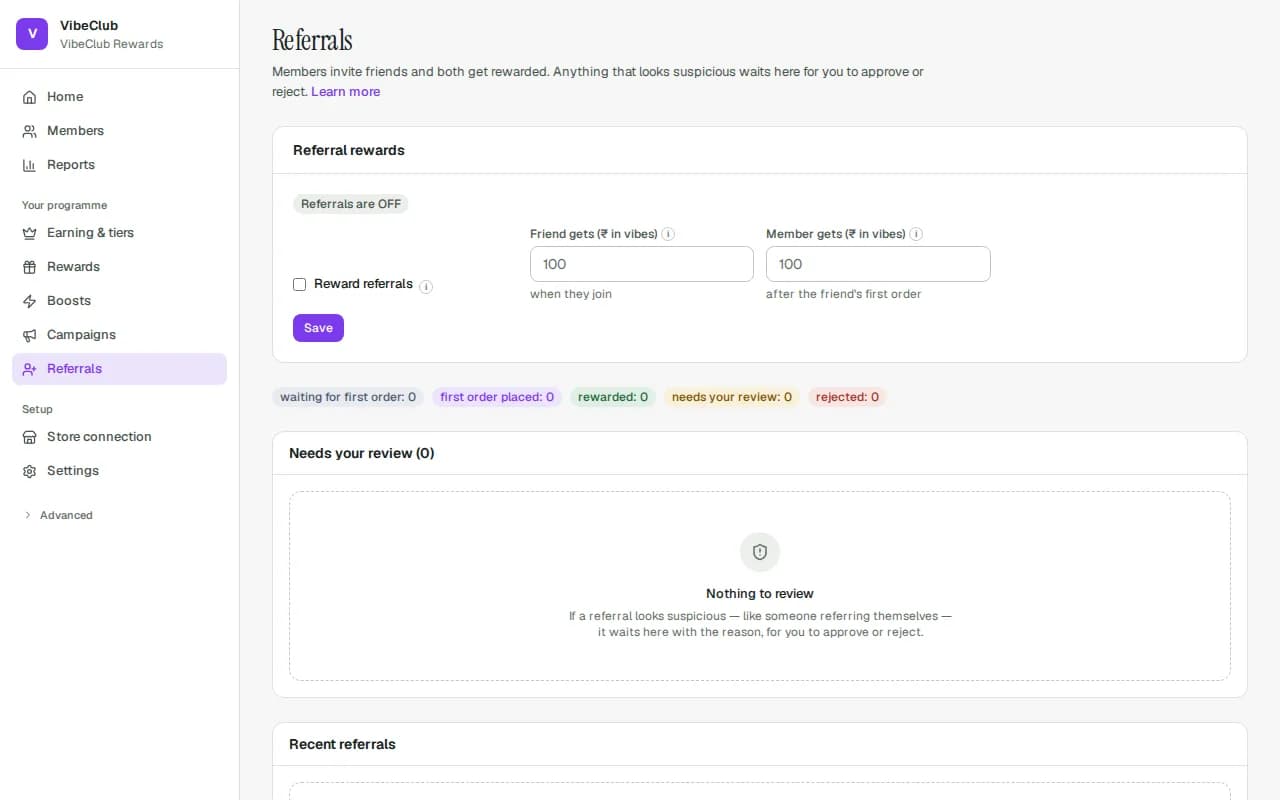
Every member has a personal code and share link on the Refer tab of your rewards page. When a referred friend joins and qualifies, both sides receive what you set in Referral rewards on the Referrals page (Friend gets and Member gets). A shared link credits the member when the friend joins from that link. Nothing is stored on the friend's device, so if they leave and come back later without the link, they can open the link again or type the member's code when they join.
When rewards are paid
By default, both rewards wait for the friend's first paid order. Signing up alone pays nothing, so fake accounts created just to collect a welcome gift earn nothing. Both rewards stay pending through your return window, and if that first order is cancelled or fully returned, both are taken back.
You can choose to pay the friend as soon as they sign up instead, with When the friend gets their reward in the Referrals card under Settings → Programme rules. Be careful with this: anyone can create accounts to collect sign-up rewards, so it is much easier to abuse. The member who shared the link is still only paid after the friend's first order.
Pay referral rewards automatically is on for new programmes. If you switch it off (same card), the friend's first paid order doesn't pay anyone straight away: the referral waits in the review queue as Waiting for you, and approving it pays both rewards.
Changed on 28 September 2026. Before this date the friend's welcome gift was paid the moment they signed up. Programmes that already existed now wait for the first paid order too. Referrals that already paid a sign-up gift keep it and are never paid twice. To go back to paying at sign-up, choose it under When the friend gets their reward.
Monthly limits
Two limits protect your budget, and both apply even if you never set them:
- Rewarded referrals per member, per month — 5 by default.
- Monthly referral budget — by default, 50 referrals' worth of rewards (friend + member reward, times 50).
A referral that would go past either limit is not lost: it waits in the review queue with the reason shown, and approving it pays both rewards. Change the limits, or set 0 for no limit, in the Referrals card under Settings → Programme rules.
Welcome discount for friends
On the Referrals page, Welcome discount for invited friends lets you give every invited friend a one-time Shopify discount code — a percentage off, or a fixed amount off, optionally above a minimum order, valid for a number of days (30 by default).
- When it arrives: as soon as the friend has joined through a member's link or code and confirmed their email. It shows on the friend's rewards card with a copy button, ready to use at checkout. Single use, once per customer, and it combines with other discounts the same way your reward codes do.
- Who qualifies: friends who join after you switch it on, confirm their email, haven't ordered from you before (it's a first-order gift, not a discount for existing customers who type a friend's code), and aren't in the comparison group. If the friend is already a customer in your Shopify store, we check Shopify too: anyone with a past order gets no code.
- Who can use it: if the friend is already a Shopify customer, the code is locked to their customer account. If they aren't one yet, Shopify can't lock it to them, so the code works for any shopper. It still only works once, so if the friend shares it, whoever uses it first gets the discount.
- Holds: a referral held for review gets no code. Approve it and the code is created; reject it and there never is one. If a referral is held, rejected or reversed after its code went out (or the friend's membership is suspended or erased), the code disappears from their card and is switched off in Shopify within a few minutes. The referral list then shows "code failed".
- The member who invited them is rewarded as set in Referral rewards — after the friend's first paid order (see When rewards are paid above).
- Shopify only: the code is a Shopify discount, so it needs your store connected. A fixed amount or a minimum order is only issued while the store sells in your programme's currency. Plain percentages work in any currency.
If Shopify is busy or briefly unavailable, we keep retrying with growing gaps (up to an hour apart) until the code is created. If Shopify rejects the code three times, the referral list shows "code failed". Nothing was taken from anyone, so there is nothing to refund.
Automatic fraud holds
Suspicious referrals never pay out silently. Holds trigger on: self-referral (shared identity — including the same inbox written two ways, like a.b+promo@gmail.com and ab@googlemail.com), shared mobile between advocate and friend, rate spikes (unusually many referrals in 24h), refund-heavy advocates, and the monthly limits above.
Working the queue
Held referrals wait under Needs your review on the Referrals page. Each shows its trigger, an advocate/friend comparison table (matching phone numbers highlighted), and join dates. Approve or Reject per row with a reason, or tick several and Reject selected with one shared reason. Every decision requires a reason and is audited. While billing is on hold, held referrals can be rejected but not approved. (Boosts set to unlock after you approve each one send their earns to Approvals, not here.)