The Developers page is where an integration that is not Shopify — WooCommerce, a custom store, a till, an app — gets its credentials. Your developer will want the developer documentation; this article is the merchant's view of the same screen. The plain HTTP API is the supported way to connect. Our Node and PHP client libraries and the WooCommerce plugin are in beta and available on request — email support@stickytier.com and we'll send them; the WooCommerce plugin hasn't yet been certified on a live store.
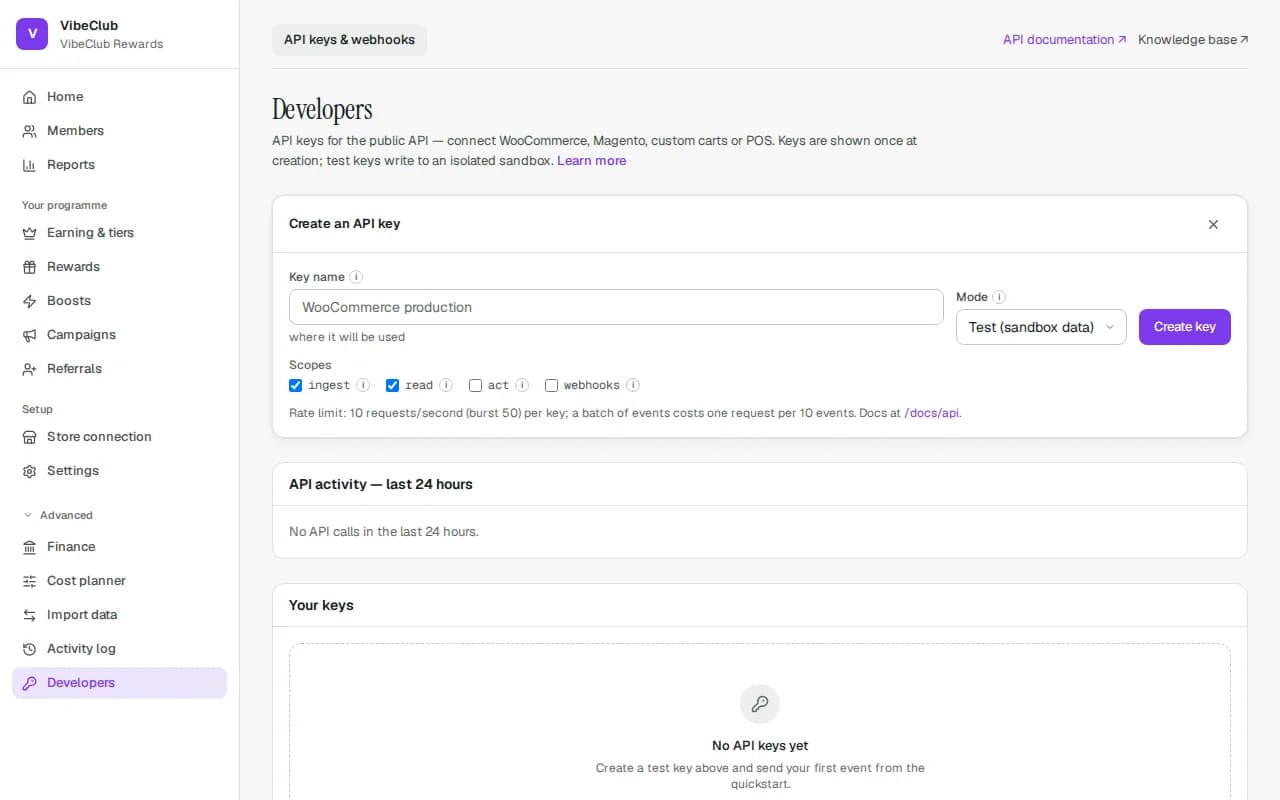
API keys
New API key opens Create an API key, which asks for three things before Create key:
- Key name — name it after the system that will use it ("WooCommerce production", "Store till").
- Mode — Test (sandbox data) writes to an isolated sandbox: its members, orders and points never appear in your analytics, liability or exports. Live writes to the real programme. Start with Test.
- Scopes — what the key may do. ingest sends orders and events; read looks up members and balances; act changes balances (enrol, adjust, redeem); webhooks manages webhook endpoints. Grant the least the integration needs; act only if it really redeems or adjusts.
The key is shown once. Copy it into the other system straight away — we keep only a fingerprint, and cannot show it again.
Live keys
A live key with act or ingest can put points on members' balances — act adjusts them directly, ingest sends the orders members earn from. A live key with read can look up every member's email, phone and birthday, and one with webhooks can send member events to any address. So every live key has the same safeguards as adjusting a balance by hand:
- Only an owner or admin can create or rotate one. Developers can still create test keys with any scope. Live keys made before this rule keep working.
- You need to have signed in recently (within your step-up window, or 15 minutes). If it's been longer, sign out and back in.
- If your programme asks for second approval, the key isn't created straight away. It appears under Key requests as waiting for approval, and another owner or admin approves it under Approvals. Then the person who asked comes back to Developers and presses Create the approved key — the key is shown to them only, never to the approver. An approved request can be used once, within 7 days.
Adjustments sent through the API follow your team's approval limit too. An adjustment above the limit isn't posted: it waits under Approvals like one made in the admin, listed as asked for by whoever created the key, and reaches the member's balance once someone else approves it. Each key can also add only so much credit per day (by default 20 times your approval limit); after that, credits through that key are refused until midnight UTC. Rotating the key doesn't reset that allowance — the replacement carries on from the old key's total. Debits are never limited. On Approvals, an adjustment sent through the API says which key asked for it ("via API key Store till …").
Each key in Your keys shows its mode, scopes and when it was last used. Two buttons:
- Rotate issues a replacement with the same scopes; the old key keeps working for 24 hours so you can swap it without downtime. A key you've already rotated can't be rotated again — rotate its replacement instead.
- Revoke stops the key immediately, with no grace. Use it for a key that may have leaked. Any adjustments the key sent that are still waiting for approval are cancelled too.
Test mode
Test keys write to a twin of your programme with the same rules, tiers and settings (campaigns are not copied, and the welcome bonus is never paid there). In the Test sandbox card, Wipe test data clears every test member, order and points entry and re-copies your current rules, so a test run starts clean and matches what live would do. Nothing in the real programme is touched.
Webhooks
A webhook endpoint is a URL on your system that StickyTier calls whenever something happens — a member joins, points move, a tier changes, a redemption completes, points are about to expire. Add the https address as the Endpoint URL, tick the Events, press Add endpoint, and copy the signing secret (shown once): your developer uses it to verify each delivery is genuine.
Under each endpoint: Send test event to check the wiring, Recent deliveries with a Redeliver button, Rotate secret, and Delete. A failed delivery is retried for about a day; after three deliveries fail completely the endpoint is switched off and shows Auto-disabled — fix the receiver, then Re-enable.
API activity
The card shows the last 24 hours — requests, successes, rejections, rate limits, errors — and the latest failed calls with their request id. Quote that id to support.
Store connection
Your Shopify connection lives on its own page, Setup → Store connection: see which store is connected and what it last sent, check for missed orders and repair the connection. See Integrations & migration.