Analytics
The top of Reports answers the question that matters: Is the programme paying off? Pick a Report period — Last 30 days, Last 90 days, Last 12 months or This year — and it compares members with customers who haven't joined: share of revenue from members, average order value, repeat purchase rate, and rewards used as a share of member revenue. Each figure shows which way it moved against the period before (for "This year" — from 1 January in your programme's time zone — the same days last year).
- Member order — the customer had already joined your programme when they placed it. Orders from guests, shoppers who never joined, and orders placed before someone joined count as not joined.
- Revenue — each order's value as your programme counts it, minus refunds recorded so far. Customers in your comparison group (holdouts) are left out of both sides.
- Repeat purchase rate — of the customers who ordered in the period, the share who have ordered more than once in total (earlier orders count). Guest orders with no customer record are left out of this one rate.
- Rewards used — rewards members spent in the period, minus anything given back when those orders were refunded.
Below that, the trend cards cover enrolment, earning, redemption and breakage over the last 12 months. Every metric expands a "What counts?" definition — no guessing whether "issued" includes reversals (it doesn't) or which time zone a month is (your programme's, set under Settings → Programme rules → Time zone).
Members vs your comparison group
With a comparison group switched on (see Change governance), Programme members vs your comparison group (all time) compares net revenue per programme member against the control group and turns the difference into estimated incremental gross margin, before reward cost — measured against your real margin where order margins exist, an assumption where they don't (it tells you which). It is not profit: it doesn't subtract rewards redeemed, referral and bonus payouts, or your plan fee. Set it against Rewards used on the same page and your plan before reading it as the programme paying for itself.
Liability & forecasting
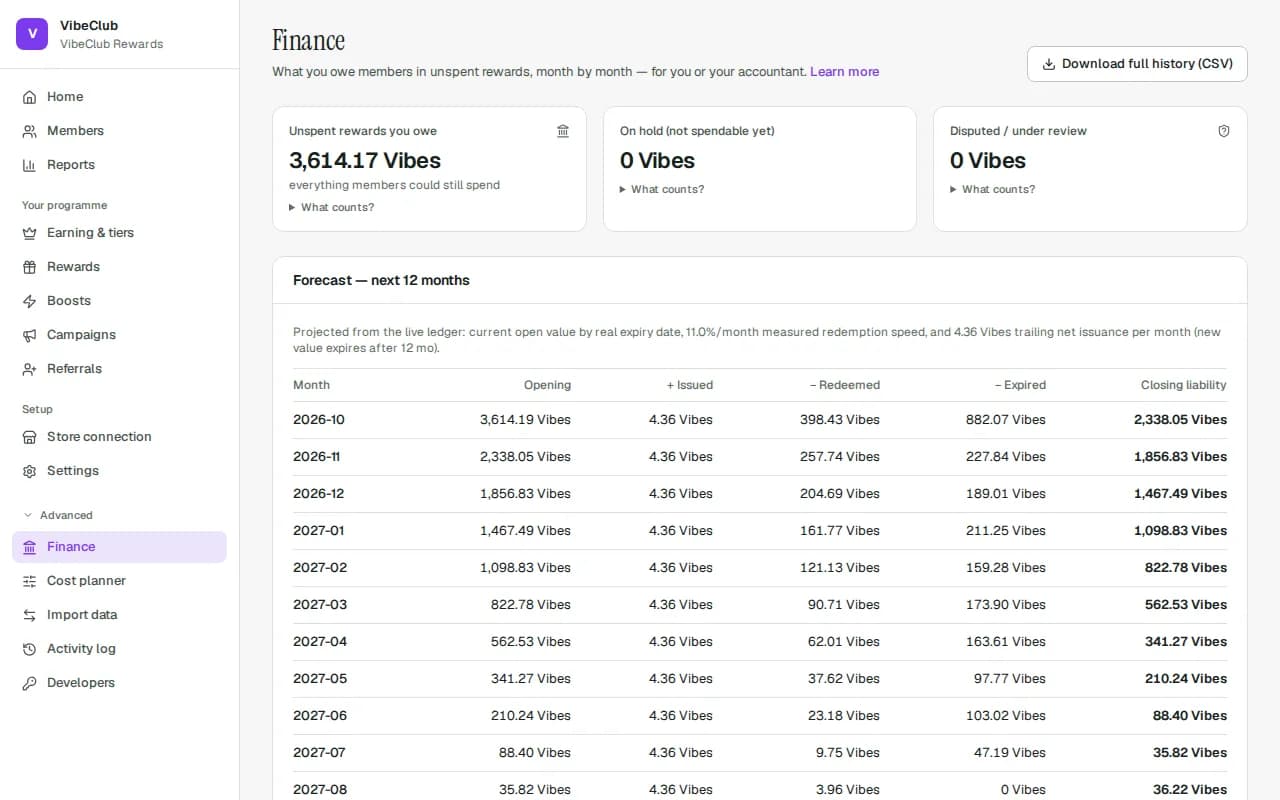
Outstanding liability is what you'd owe if every member redeemed today — every member's spendable balance plus value still on hold (inside its release window), derived from the append-only ledger, never estimated. Value under review is shown separately as Disputed / under review and is not counted until it's approved; rejected rewards count for nothing. A reinstated redemption (an order cancelled after the member spent points on it) gives the value back, so it adds to liability. Every figure on the Finance and Analytics pages, and GET /v1/tenant/liability, uses this same definition. The Forecast — next 12 months projects it forward from real open value by expiry date, your measured redemption speed, and trailing issuance: opening, issued, redeemed, expired, closing — month by month.
Closing a month
On Finance, Close a month (for your accounts) — pick the Period (YYYY-MM) and press Close period — freezes what you owed at the end of a month that has fully ended. Months follow your programme's time zone (Settings → Programme rules → Time zone): a month ends at your local midnight, and the current month and future months can't be closed. Each close records the time zone it was closed in, and:
- Opening — last month's closing, if last month is closed; otherwise worked out from the ledger as of the first of the month.
- Movements — issued, adjustments (net), reinstated, redeemed, expired and reversed during the month.
- Closing — opening + movements, worked out from the ledger as of the end of the month. Activity after the month end never changes it.
If something from an already-closed month changes later — say a pending reward from June is rejected in August — the closed month is not rewritten. The next month you close shows the difference as a separate prior-period adjustment line (Prior-period adj.), so opening + prior-period adjustment + movements = closing always holds. A closed month can be reopened with Reopen and a reason (audited), and closed again. Closing and reopening months is part of the accounting close & bulk grants plan feature.
Months closed before programmes had time zones were UTC months, and say UTC in the list. If the time zone differs between two closes — your first close after that change, or after you switch zones — the later month starts exactly where the earlier close ended rather than at its own local midnight, so it runs a few hours shorter or longer than a calendar month and nothing is missed or counted twice. Any closed month that doesn't cover exactly your current calendar month (closed in another zone, or lined up with one) is marked with * and shows its exact start and end.
Close months in order and reopen them newest first: a closed month can't be reopened while a later month is closed (the message names it), and a month can't be closed after the next one if its closing would no longer match the opening that month already froze — reopen the later month first. A reopened month is closed again in the zone it was first closed in.
The accounting export
Download full history (CSV) at the top of Finance exports the full ledger straight away — whole hundredths of your programme currency (with the currency on every row), rule versions, parent links, idempotency keys, reasons, actors, timestamps (exact UTC, plus the time in your programme's time zone and the month it belongs to, so a month closed in your current time zone is one filter on period away; for a month marked * on the Finance page — closed in another zone, including every UTC close from before time zones — filter on its exact start and end instead). It reconciles to the cent against the liability figure because both come from the same ledger. The Exports card builds ledger, members and referrals files in the background (one “Export …” button each); each download link lives for 24 hours. Exports are on every plan and in every billing state, limited by role (Finance, Admin, Owner) and audited.
Recovery cases
When an order is refunded after the member already spent its rewards, their balance goes to zero and the rest is listed on Finance under Recovery cases. For each one choose Waive, Settled outside or Restrict account, give a reason and press Apply. Anyone who can adjust balances can decide.